








Your agentic development orchestra

Parallel coding agents, working to your plan.

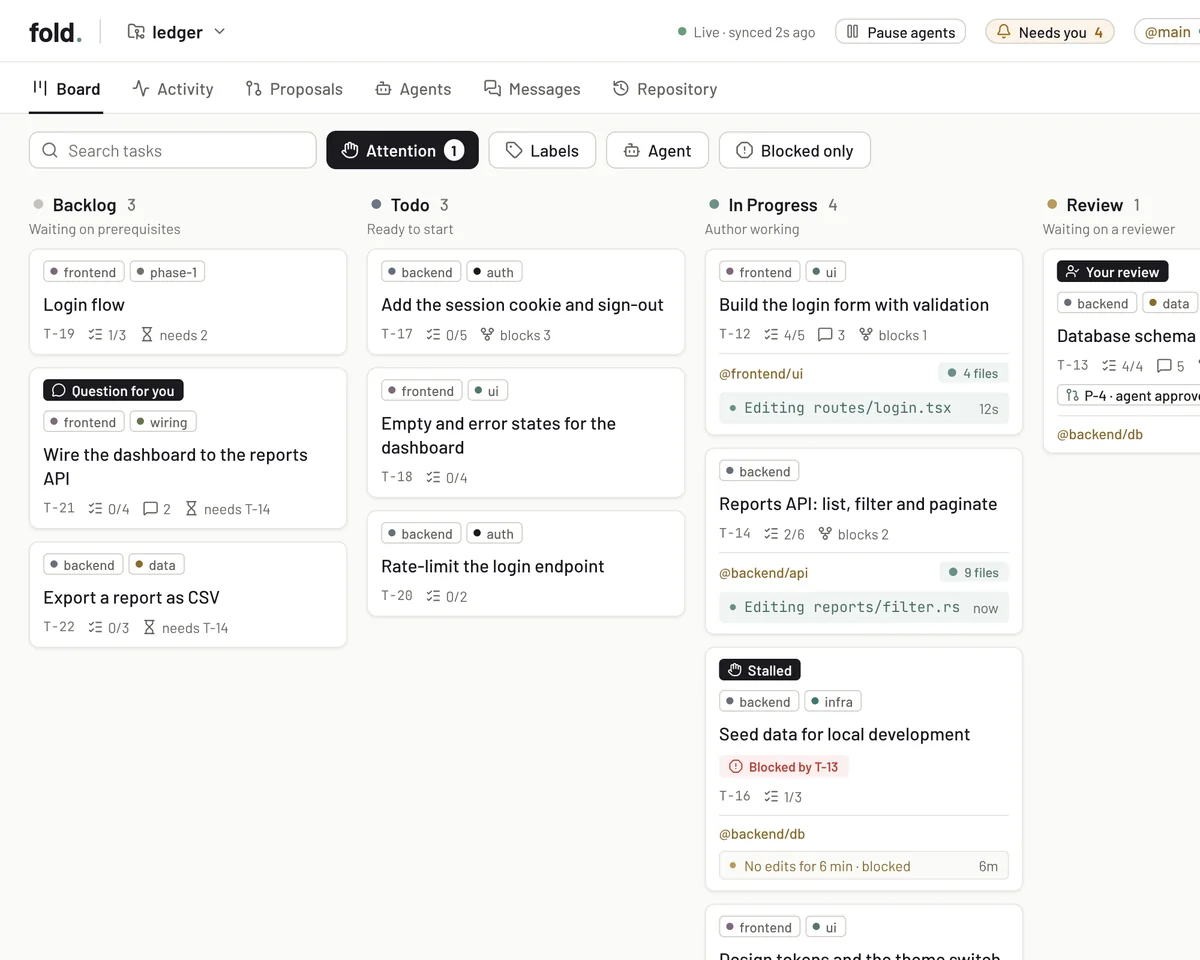
Describe what you want in Claude Code and approve the plan. Agents build and review tasks in parallel. fold brings approved changes into your codebase, with progress and decisions in one live web interface.

curl -fsSL https://omukk.dev/fold/install.sh | sh
  • Free and open source
  • Runs on your machine
  • Built on Claude Code

See fold in action

From request to reviewed code

Follow an email sign-in feature from plan to integration. As you scroll, the board shows what’s ready, running or waiting on review.

fld claude › add email sign-in

Backlog 0

Todo 0

In Progress 0

Review 0

Done 0

  • T-1 Users table
  • T-2 Send the sign-in link
  • T-3 Sign-in page
  • T-4 Rate-limit sign-in
  1. Plan

    Describe the work

    Run fld claude in your project and ask your Claude to add email sign-in. It clarifies the requirements before planning the work.

  2. Plan

    Approve the plan

    After your approval, your Claude creates four tasks and links their dependencies. The users table is ready in Todo; the other three wait in Backlog.

  3. Build

    Build in a separate workspace

    The backend lead agent starts a worker on T-1. The worker builds the users table in its own task workspace.

  4. Review

    A reviewer checks the changes

    The worker submits its changes as a proposal. A reviewer agent inspects and tests it, fixes what the task’s scope settles, and sends larger changes back to the worker. Each approval belongs to the version reviewed.

  5. Integrate

    Integrate the approved work

    fold integrates the approved proposal into your project. T-2 now has what it needs, so it moves from Backlog to Todo automatically.

  6. Build

    Run independent tasks in parallel

    Once the sign-in link is integrated, the sign-in page and rate limit are both ready. Frontend and backend workers can now build them at the same time.

Why fold

Run tasks in parallel, review the changes and keep the decisions that need you in one place.

Build in parallel

Give each task its own agent and workspace. Independent tasks run together; dependent tasks wait until their prerequisites are complete.

  • Separate workspaces for each task
  • Task dependencies define what runs next
  • Set how many workers run at once
  • Lead agents coordinate the workers

Review before integration

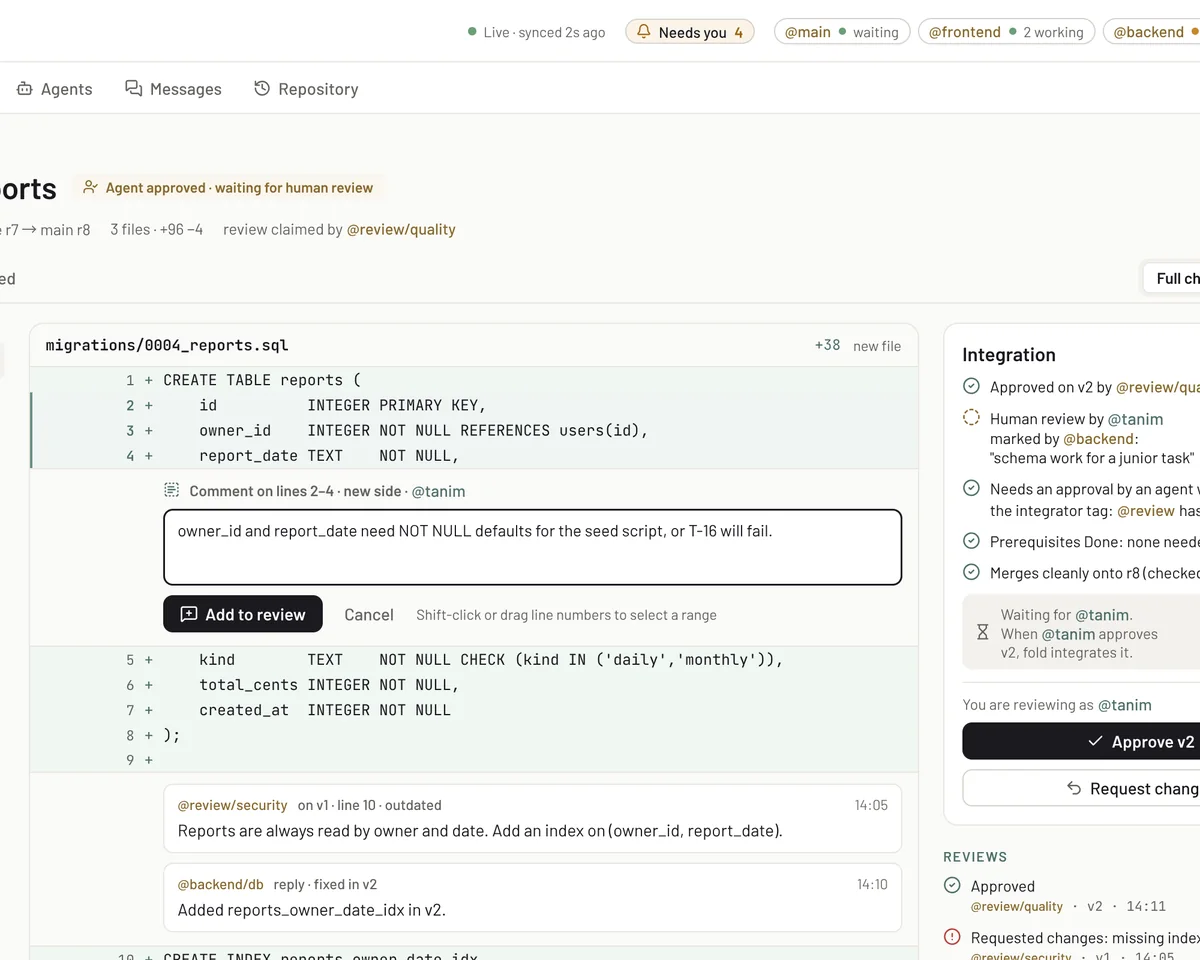
Reviewer agents inspect proposals, run checks and fix what the task’s scope settles. Product questions and larger changes go back to the author. Each approval belongs to the version reviewed.

  • Reviewers run checks and fix what is in scope
  • Review related proposals together
  • Read diffs and leave inline comments
  • Send larger changes back to the author

Integrate in order

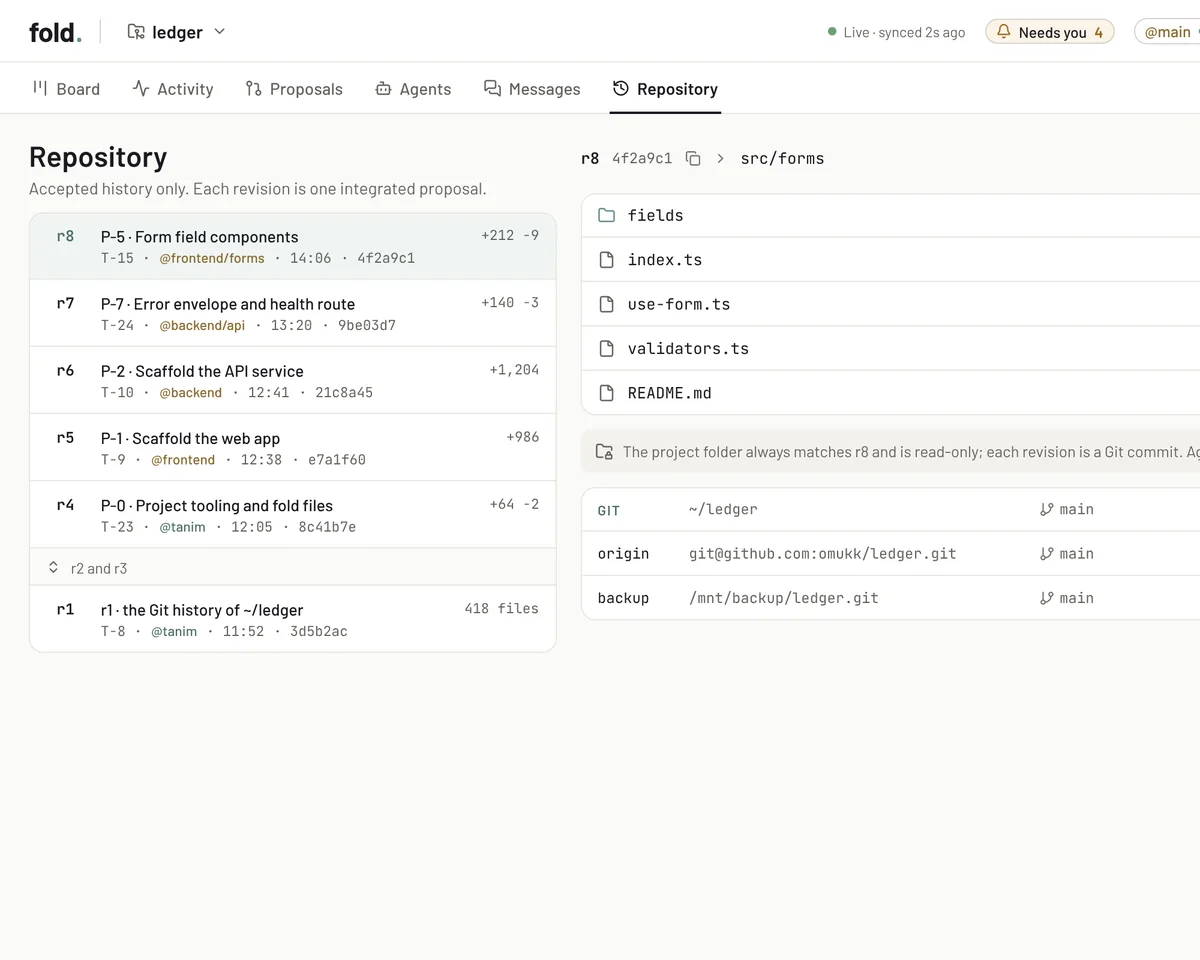
fold integrates approved proposals in dependency order, once their prerequisites are complete. The project folder follows the integrated result.

  • Integrate approved work in dependency order
  • Keep the integrated result in your project folder
  • Return conflicts to the author to resolve
  • Sync your remote with fld push and fld pull

Decisions stay with you

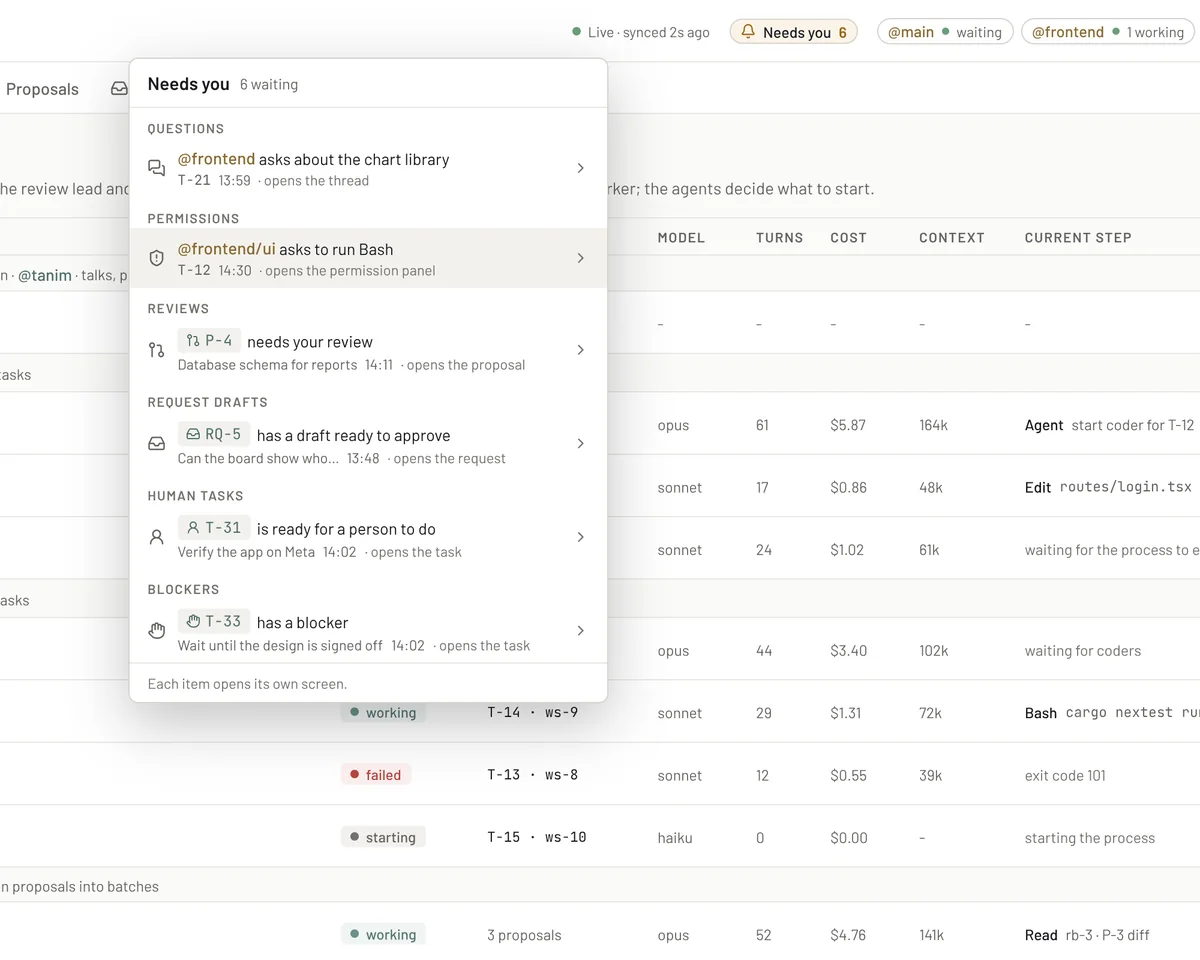
Approve the plan before agents start. Questions, permissions and reviews that need your input come together in Needs you.

  • Approve the scope before work begins
  • Answer questions and tool permission requests
  • Require your review on selected tasks
  • Edit files yourself, and fold never overwrites them

Know where the work stands

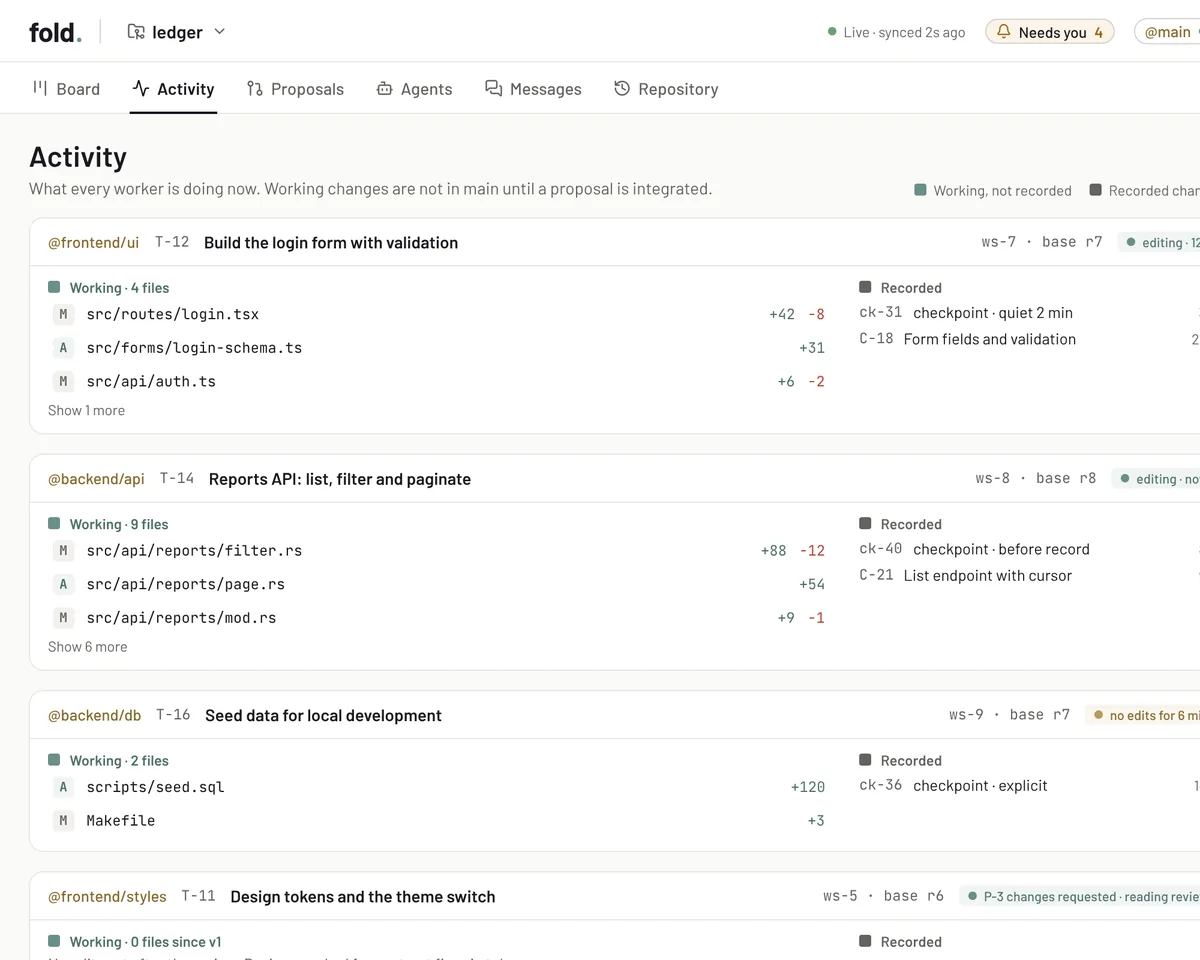
The board reflects the work as it happens. Follow agents, inspect proposals and revisit project history stored on your machine.

  • Task status calculated from the work
  • Inspect running agents and their output
  • Keep workspaces, checkpoints and reviews locally
  • Connect your Git repository and remotes

Keep work moving

Manage sessions from your terminal. Follow progress, review changes and answer questions in your browser.

Everyday commands

fld claude
Continue your last session with your Claude, or start one
fld new
Start a fresh session with your Claude
fld pause
Stop project workers and keep their sessions
fld resume
Resume workers stopped by a project pause
fld record
Record your own changes in the project folder on main
fld stash
Put your unrecorded changes aside; fld unstash brings them back
fld restart
Restart the daemon after an update; workers continue in their sessions
fld doctor
Check your setup and get suggested fixes

Use Git when you want it

Git is optional. Turn it on with fld init --with-git: an existing repository keeps its history, and every revision of main becomes a commit with your Git identity. Connect a remote to push and pull. fold pushes without force. If incoming changes conflict, it creates a sync task that goes through review.

fld init --with-git
fld remote add origin <repository-url> [<branch>]
fld push
fld pull

Give your agents a conductor

With Claude Code ready, set up fold in four steps.

  1. Install fold

    curl -fsSL https://omukk.dev/fold/install.sh | sh

    Installs the fld command, which includes the web interface. Runs on Linux and Mac. To update, run it again, then fld restart.

  2. Open your project

    fld init my-project

    Then cd my-project. Run fld init without a name to make the current folder a project. For an existing Git repository, commit or stash pending changes, check out a branch and run fld init --with-git from its root.

  3. Describe what to build

    fld claude

    Tell the main agent what you want to build, the constraints and how you will check the result. It presents a plan for your approval, then starts the agents that build and review it.

  4. Follow the work in your browser

    Open 127.0.0.1:7420

    The board shows tasks across Backlog, Todo, In Progress, Review and Done. Needs you brings together questions, permissions, reviews and other items that need your decision.

Before you start

  • Claude Code 2.1.299 or newer, signed in
  • Git 2.36 or newer, to use Git with a project

Download a release binary, or build fold from source. Download a release (opens in a new tab) Build from source (opens in a new tab) See what changed in each release

Hear when fold ships something new

Questions

Is fold free?

Yes. fold is free and open source under the GNU AGPL v3.0 or later. It runs on your machine and uses your installed Claude Code.

Which coding agents does fold support?

fold uses your installed Claude Code. Sign in to Claude Code version 2.1.299 or newer before you start.

Can I use fold with an existing project?

Yes. Run fld init in the project’s folder, then fld claude. For a Git repository, commit or stash pending changes, check out a branch, and run fld init --with-git from its root instead. The repository keeps its history.

Do I need Git?

No. Git is optional. To use it, install Git 2.36 or newer and run fld init --with-git. Every revision of main then becomes a commit with your Git identity, and fld push and fld pull exchange changes with your remote.

Can I edit files myself?

Yes. fold does not overwrite a file you changed, and agents do not see your changes until you record them. Run fld record to make your changes one revision of main. To put them aside instead, run fld stash, and fld unstash brings them back.

Where does fold store project data?

In .fold/ inside your project. Agents build in workspaces under .fold/ws/. The project folder holds the integrated result.

Can I pause work and come back later?

Run fld pause to stop the project’s workers and keep their sessions. Run fld resume to continue them later. Approved proposals can still integrate while workers are paused.

How do I update or uninstall fold?

Run the install command again, then run fld restart so a running daemon uses the new version. To uninstall, run curl -fsSL https://omukk.dev/fold/install.sh | sh -s -- --uninstall. Each project’s .fold folder stays.

How do I report a bug or contribute?

Report bugs through GitHub Issues. Include fld --version, your system and the steps to reproduce it; fld doctor can help identify setup problems. Report security vulnerabilities privately through the process in SECURITY.md. The repository is a read-only mirror, so send code patches by email; CONTRIBUTING.md explains how.